| Table of ContentsWhat real-time vitals monitoring in a virtual consultation isThe vitals worth streaming firstCapturing readings from patient devicesStreaming vitals alongside the video callKeeping every reading clinically trustworthyAlerts and thresholds during the callWriting vitals into the EHRSecurity and compliance for live vitalsWhat it costs to buildProof: a clinical analytics platform we shippedFAQs |
As the Founder and CEO of Acquaint Softtech, a software product development partner, I hear the same question from almost every telehealth founder: our doctors can see the patient on video, so why can they not see the patient’s vitals?
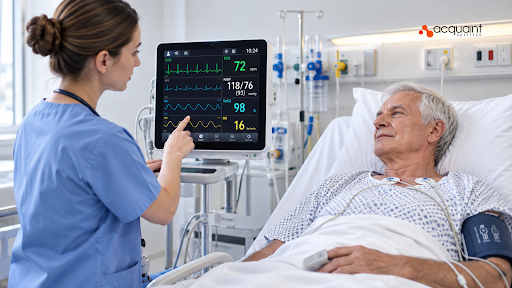
The answer is a real-time vitals layer. It pulls readings from connected devices in the patient’s home, such as a pulse oximeter, blood pressure cuff, or thermometer, and shows them live beside the video feed, so the clinician works from numbers instead of descriptions. This guide covers how to build one, from device capture and streaming to alerts, EHR integration, compliance, and cost.
A vitals panel that shows a stale or wrong number is worse than none, because a clinician will make a care decision on it. The approach here draws on healthcare products Acquaint Softtech has delivered as an ISO 27001 certified Official Laravel Partner, with 1,300+ projects, 70+ in-house engineers, and clients across the USA, UK, Europe, and Australia who get a dedicated team within 48 hours of a brief.
What real-time vitals monitoring in a virtual consultation is
Real-time vital signs monitoring during a virtual consultation is a telehealth feature that captures physiological readings from patient devices and displays them to the clinician live, during the video call. It turns a remote visit from a conversation into something much closer to an in-person exam.
Live vitals versus remote patient monitoring
Remote patient monitoring (RPM) collects readings over days or weeks and reviews them later. Live vitals work the other way: a reading taken now appears on the clinician’s screen within seconds, while the patient is still on the call. Most platforms eventually need both, so design one data pipeline that serves the live panel and the long-term trend view from the start.
The vitals worth streaming first
The vitals worth streaming first are heart rate, blood oxygen, blood pressure, temperature, and respiratory rate. Connected home devices already exist for each, and clinicians ask for them in almost every remote visit.
| Vital | Typical home device | Engineering note |
| Heart rate | Pulse oximeter or chest strap | Continuous stream; sample rate matters |
| Blood oxygen (SpO2) | Fingertip pulse oximeter | Mark readings taken with a weak signal |
| Blood pressure | Upper-arm cuff | One reading per measurement, not a stream |
| Body temperature | Connected thermometer | Store the unit with every value |
| Respiratory rate | Wearable or camera estimate | Least reliable; always label the source |
Capturing readings from patient devices
Most connected home devices send readings over Bluetooth Low Energy (BLE), a short-range wireless standard built for low-power hardware, to a phone or tablet app that relays them to your backend. The Bluetooth SIG publishes standard profiles for common vitals, including Heart Rate, Blood Pressure, Health Thermometer, and Pulse Oximeter services, which lets one app support many device brands.
Pairing a patient can actually finish
The weakest point in the chain is usually the pairing screen, not the protocol. Pair the device before the appointment, confirm a test reading, and fall back to manual entry if the connection drops mid call.
Getting this right across iOS and Android Bluetooth behaviour is specialist work, and teams that hire mobile app developers with BLE experience avoid the silent disconnects that ruin a consultation. Camera-based heart rate estimates, known as remote photoplethysmography (rPPG), need no device at all, but accuracy varies with lighting and movement, so label them as estimates.
Streaming vitals alongside the video call
Vitals should travel on a channel built for small, frequent messages, separate from the audio and video tracks, so a poor video connection never delays a critical reading. The two practical options are a WebRTC data channel inside the call, or a WebSocket connection through your backend.
| Option | Best for | Trade-off |
| WebRTC data channel | Direct delivery between patient and clinician during the call | Readings must still be sent to the server for storage |
| WebSocket via backend | Storage, alerts, and sessions with several viewers | Adds a server hop to every reading |
| Polling every few seconds | Simple first prototypes | Visible lag and wasted requests |
Design for a freshness budget
Decide how old a reading can be before it stops being useful, then design backward from that number. Show a timestamp beside every value and grey it out when it goes stale, so the clinician always knows whether the number on screen is current or thirty seconds old.
Keeping every reading clinically trustworthy
A vital sign is only trustworthy if you can say which device took it, when it was taken, in what unit, and whether the signal was good. Store these attributes with every reading, not in a separate table you hope stays in sync.
Flag bad readings instead of hiding them
Many devices report a signal quality indicator or error flag for problems such as motion or poor sensor contact. Keep the reading, mark it as low quality, and show that flag to the clinician. Silently dropping readings hides problems, while silently keeping them invites wrong decisions.
Alerts and thresholds during the call
Alerts during a virtual consultation should highlight a reading that crosses a clinically defined threshold without flooding the screen. The thresholds must come from clinicians and ideally be set per patient, because a normal resting heart rate for one person is a warning sign for another.
Per-patient limits, owned by the care team
Store default ranges, let the care team override them per patient, and log every change with who made it. Check the regulatory position before shipping alerting logic: in the US, the FDA can treat software that analyzes physiological data to drive clinical alerts as a medical device, and the EU MDR and UK MHRA take comparable views.
Writing vitals into the EHR
Vitals captured in a consultation should land in the patient’s electronic health record (EHR) as structured data, not as a PDF attached to a note. The standard route is HL7 FHIR, a modern API standard for exchanging health data, where each reading is stored as an Observation resource coded with LOINC.
Code once, reuse everywhere
LOINC is the shared code system for clinical measurements: heart rate is 8867-4, systolic blood pressure is 8480-6, and body temperature is 8310-5. Map every device reading to the correct code at ingestion, and the same data flows cleanly into Epic, Oracle Health, or any other FHIR-capable system.
EHR integrations are where timelines slip, and teams that hire API developers with FHIR experience save months of rework against each vendor’s authentication and data quirks.
Security and compliance for live vitals
Live vitals are protected health information, so they need the same safeguards as the rest of the medical record: encryption in transit and at rest, strict access control, and a full audit trail. In the US this falls under HIPAA, and in the UK and EU health data is a special category of personal data under GDPR.
Log every view, not just every write
The HIPAA Security Rule requires audit controls that record activity in systems holding health data. Log who opened a patient’s live vitals panel and when, not only who changed a record, because in telehealth the viewing itself is the sensitive event. Sign a Business Associate Agreement with every vendor that touches the stream, including your video and cloud providers.
What it costs to build
The cost of a real-time vitals layer depends on how many device types you support and whether you need clinical alerts and EHR write-back. A focused first version with two devices and a live panel is far cheaper than a multi-device platform with alerting.
| Scope | What you get | Typical range (USD) |
| MVP vitals panel | Two BLE devices, live panel, secure storage | $18,000 to $40,000 |
| Full clinical integration | Multiple devices, alerts, FHIR write-back, audit reporting | $40,000 to $95,000 |
Where the savings are
Start with the two devices your clinicians ask for most, usually a pulse oximeter and a blood pressure cuff, then add alerts and EHR write-back once the data pipeline is stable. This staged build runs at up to forty percent cost savings versus Western agencies, with blended rates of roughly twenty-five to forty-nine US dollars per hour.
Proof: a clinical analytics platform we shipped
Live vitals and clinical analytics share the same hard problem: turning raw health readings into a signal a clinician trusts enough to act on. Acquaint Softtech built a secure predictive analytics framework and clinical leadership dashboards for Bianalisi, Italy’s largest integrated diagnostics group. The account below is drawn from the client’s verified 5.0 out of 5 Clutch review.
| Challenge | Solution | Result |
| Abnormal diagnostic trends surfaced only after monthly audits | Predictive models flagging early risk indicators | Recurring risk patterns caught within the same reporting cycle |
| Lab trend analysis needed manual extraction from regional systems | Secure ingestion layer and a centralized analytics engine | Consolidated cross-regional trend analysis |
| Strict European data protection rules | Access-controlled APIs, audit trails, and anonymization safeguards | Compliance changes absorbed without disrupting delivery |
The platform ran on a Python backend, with laboratory directors validating model assumptions before anything went live. In one case, a regional medical supervisor spotted an unusual spike in lab indicators within a patient group and started a review immediately, instead of waiting for periodic analysis. The takeaway for any vitals project is the same: clinicians act on data they trust, and that trust is engineered in the pipeline, not the chart.
FAQs
What is real-time vital signs monitoring in telehealth?
It is a feature that streams readings such as heart rate, SpO2, and blood pressure from patient devices to the clinician during a video visit. The clinician sees current numbers within seconds instead of relying on the patient’s description.
Which devices work for live vitals during a video visit?
Bluetooth Low Energy pulse oximeters, blood pressure cuffs, thermometers, and heart rate straps work best, especially those following Bluetooth SIG health profiles. They pair with a phone or tablet app that relays each reading to the platform.
Should vitals travel over WebRTC or WebSockets?
Use a WebRTC data channel for the fastest delivery inside the call, and a WebSocket through your backend when you need storage, alerts, or several viewers. Many platforms use both, keeping vitals separate from the audio and video tracks.
How do live vitals get into the EHR?
Each reading is written as an HL7 FHIR Observation coded with LOINC, such as 8867-4 for heart rate. Mapping codes at ingestion lets the same data flow into any FHIR-capable EHR without rework.
Is a live vitals feature regulated as a medical device?
Displaying readings from a cleared device is usually lower risk, but software that analyzes vitals to drive clinical alerts may count as a medical device. Confirm the position with the FDA, EU MDR, or UK MHRA rules before launch.
How long does it take to build a live vitals layer?
A focused first version with two devices and a live panel usually takes a few months with a small dedicated team. Alerts, EHR write-back, and more device types take longer, since each depends on a clean data pipeline.